


Comparison / Trend Analysis Module
Summary
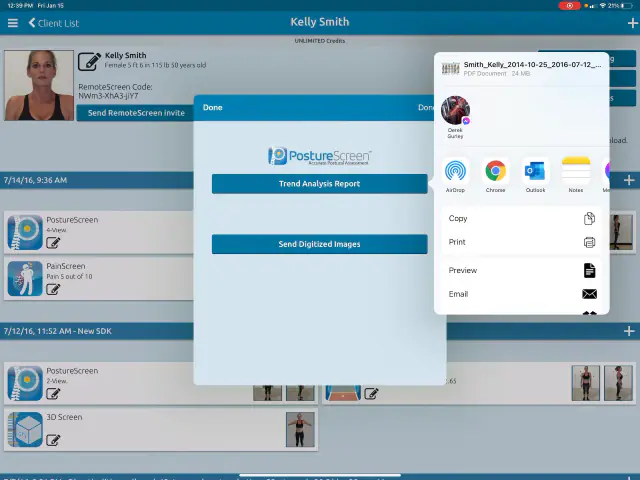
Please take note that, to utilize this module, the patient’s chart must include more than one examination. It’s common for multiple exams to be conducted for a single patient using the same name.
However, this is not the correct method for employing the module. The correct procedure involves locating the patient, selecting ‘new exam’, and conducting a fresh examination. By following this process, all exams become part of the patient’s history. Once this is established, you can proceed with a Posture Trend Analysis or Comparative Examination.
PLEASE Note, you must be in an existing patient’s account prior to creating a NEW exam in order for all the exams to be managed under their account. If you simply start a new exam, you will effectively be creating a new account for the same patient, where then you can not compare results.
 9:06
9:06
Related articles
-
 PostureScreen for iPad & iPhone
Sample Reports generated from PostureScreen
Posture Assessment 2 View Client Posture Assessment 4 View Professional Posture Assessment Comparison (Client) Posture Assessment…
1 min read
PostureScreen for iPad & iPhone
Sample Reports generated from PostureScreen
Posture Assessment 2 View Client Posture Assessment 4 View Professional Posture Assessment Comparison (Client) Posture Assessment…
1 min read
- PostureRay X-Ray EMR Report & Comparison Report Generation Step-by-step PostureRay training for customers. Video · 11:501 min read
-
PostureScreen for iPad & iPhone
Cloud Backup (formerly known as SyncScreen), RemoteScreen and Backup
What is our Cloud Solution: Cloud Backup Subscription Service (formerly known as SyncScreen Cloud)
8 videos · 37:426 min read
-
PostureScreen for iPad & iPhone
Demographic Export Module
This feature allows you to quickly generate a Excel style demographic report for all screenings performed between a specified date range…
Video · 3:023 min read
-
PostureScreen for iPad & iPhone
Edit Colors, Branding Logo, Report and Email Templates Module (iOS)
This powerful module is ideal for professionals who want full control over their branding. Customize both your outgoing email templates…
Video · 9:022 min read
-
PostureScreen for iPad & iPhone
LeanScreen – Your First Assessment
This is a LeanScreen tutorial – The Fat Analysis Photo Finish. This patented technology feeds measurements data for body composition into…
Video · 3:522 min read
Have a question?
Talk to the people who build PostureScreen and PostureRay.
PostureScreen support is by email. Live PostureRay support runs Monday through Friday, 9 AM–5 PM Eastern (excluding U.S. holidays).