




How to change your iOS Subscription
Summary
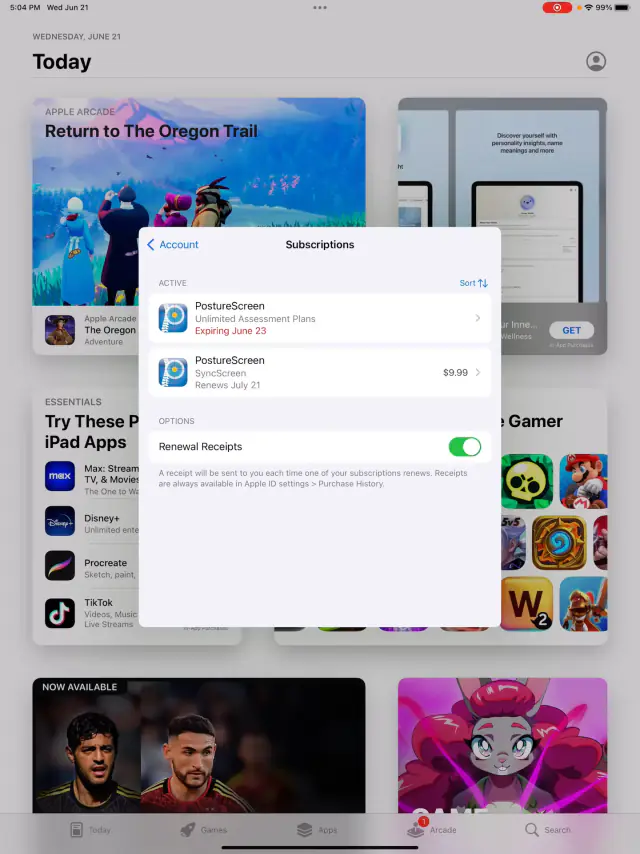
Changing your Apple iOS Subscription for PostureScreen is no different than any other application. This is all controlled completely through the Apple AppStore directly, not our application.
To Edit, Upgrade, or Cancel and change an existing subscription, simply under the Upgrades button, click Manage Subscriptions button -OR- open AppStore app directly and follow these steps.
A Step By Step Tutorial from Apple is also available here: https://support.apple.com/en-us/HT202039
 2:32
2:32
Related articles
-
 PostureScreen for iPad & iPhone
How to check subscription status and / or change your subscriptions within PostureScreen
Many PostureScreen users reach out to support asking us to look up their account because the app isn’t working or they want to check their…
Video · 4:172 min read
PostureScreen for iPad & iPhone
How to check subscription status and / or change your subscriptions within PostureScreen
Many PostureScreen users reach out to support asking us to look up their account because the app isn’t working or they want to check their…
Video · 4:172 min read
-
PostureScreen for iPad & iPhone
UNLIMITED use Subscription
As summarized on the AppStore and on our main website, the initial purchase of PostureScreen includes a use for 30 days. After the…
3 min read
-
PostureScreen for iPad & iPhone
Navigation Button Update in version 14.5 of PostureScreen
Our navigation buttons have been updated, and this tutorial gives you the details. Please be sure to share this with all your team members…
2 videos · 22:281 min read
-
PostureScreen for iPad & iPhone
Credits Removed – PostureScreen is now Subscription only
If you are viewing this knowledge base article, you may be curious about why we decided to remove credits as a payment option for…
3 min read
-
PostureScreen for iPad & iPhone
Cloud Backup (formerly known as SyncScreen), RemoteScreen and Backup
What is our Cloud Solution: Cloud Backup Subscription Service (formerly known as SyncScreen Cloud)
8 videos · 37:426 min read
-
PostureScreen for iPad & iPhone
Changing iOS Device Language
The application does default to whatever language iOS is running on the device. You can change the language for a specific application and…
1 min read
Have a question?
Talk to the people who build PostureScreen and PostureRay.
PostureScreen support is by email. Live PostureRay support runs Monday through Friday, 9 AM–5 PM Eastern (excluding U.S. holidays).