






PostureRay version 24
Summary
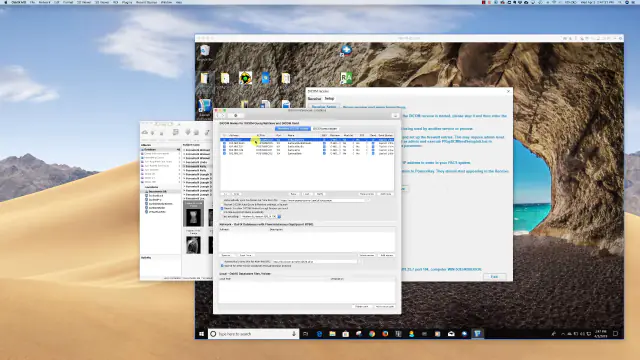
DICOM X-Ray Receive This new feature allows for x-rays to be pushed directly to PostureRay from compliant x-ray acquisition software or PACS software allowing the doctor to save time during import x-ray phase.
After PostureRay learns how the images are named, it will automatically set up the patient case when x-rays are sent to PostureRay with the patient information from the x-ray software system as well as “pre-map” them to the correct x-ray assignment. This is one of the most time consuming aspects of importing x-rays on earlier versions of PostureRay.
 5:09
5:09
Added optional points for digitizing for stitching purposes
- LCN: added optional T2 to T10
- LLN: added optional T8 to T11
Added Stitching variables:
- First step: controls to select which X-ray is behind and which is in front.
- Thoracic Scoliosis with modified Fergusson non-scoliosis
- AP Cervical with Thoracic Scoliosis with modified Fergusson non-scoliosis
- APOM with Thoracic Scoliosis with modified Fergusson non-scoliosis
- Thoracic Scoliosis with AP Lumbar
- Lateral Cervical with Lateral Lumbar
- Stitching Lateral sectionals: if concatenated comments exceed maximum length, truncate the Lat. Fullspine comment to fit.
- Stitching with Lateral Lumbar ext./flex. problems fixed. This was sometimes interfering with the Lateral Lumbar Neutral.
- Stitching with duplicate scoliosis start, apex or end vertebrae was causing multiple error messages.
- On extremely narrow portrait monitors, the left part of the stitching dialog box wasn’t visible
DICOM listen: listen for DICOMs posted from a PACS system.
DICOM Image Processing:
- The last Method B DICOM loaded in an Evaluation had problems saving touch-ups.
- DICOM JPEG2000 header case with “E07F”, “1000” and OW instead of OB
- Added apostrophe to DICOM search
- Search DICOM: Patient Name and ID tags were much further in the DICOM header for a few DICOMs to be found.
- Extract special characters like é, ç, ï from the DICOM header’s Patient Name and permit searching on these characters
- DICOM JPEG2000 auto-invert from negative
- Split Image button 2.5 times bigger to facilitate it’s use
Quick Draw:
- Lateral Fullspine Quick Draw: results were 0mm and curve missing on reports and Viewbox.
- AP Thoracic non QD mixed with AP Lumbar QD caused an error message “Apex must have a value. Reset to first entry. This message wouldn’t go away.
- Changes to Lateral Cervical, Thoracic, Lumbar and Full calculations to skip all non-QD calculations.
Patient Comparative Report:
- CBP LCN global % change (it was showing the first two segmental analysis values)
- When LF or AP Full are very wide vs high, the assessment text was overwriting the X-rays at the top of the page.
- added LF stitched
Impression Comparative Report:
- Left Lateral Posture page wasn’t showing if all four postures were present
- Right Lateral Posture images weren’t showing if the Back Posture wasn’t present.
Viewbox:
- When we have a scoliosis view, show checkbox to show/hide the centroids (blue Xs) on the Impression lines
- Added next to View button, Order Select and Compare radio buttons
- Processing of comparisons with Postures and Marking views. Other views not available yet.
- Hiding/showing of applicable checkboxes/radio buttons based on displayed view types
SQL Express 2017:
- Installation of SQL Express 2017 with PostureRayNet
- Upgrade and conversion of PostureRay from SQL Express 2012 to SQL Express 2017
General:
Patient age: Instead of calculating the age with rounding up, for example age 17.6 is 18, we round down so age 17.6 would be 17.
Scoliosis Impression lines: made red actual line like the Patient line
LL ext/flex angle signs were absent.
AP Thoracic and AP Fullspine follow-up X-ray. If saved before finishing digitization, the apex list box button had apices side by side instead of a vertical list and there was an error about drawing actual lines after digitization. This released fixes the problem.
Patient Report: Lateral Fullspine line description had low back instead of Lateral Fullspine.
C0-C1 instability LC, LCE and LCF: calculation of line angle to horizontal difference replaced with law of sines calculation.
Optional setting to export Patient Name, Birth date and X-ray date on X-ray
Reports with optional separate files per view: have continuous page numbering within a report file:
- Impression report
- Instability report
- Comparative impression report
- Comparative instability report
Travel Sheet: in some cases 9 X-rays/page had overflowed text in the Results section.
PostureScreen push: initially in Evaluation form, female patients were appearing as male. This was just a setting issue because the data was good.
APOM bending C1-C2 overhang in Impression report summary table: cut-off is 3.0 rounded to one digit, degree changed to mm for < 3.0 mm
E.H.R. export form opened from View Evaluation form or Report form, the AP Full view wasn’t being shown in the list and so couldn’t be exported.
Modified Fergusson case when digitizing started at L4: the LD and Translation were appearing at the same location in the Viewbox overlay.
Evaluation change practitioner: added on View Evaluation form for admin user.
DMX form, step backwards one frame with note below the seconds radio button.
Save DMX Magnification setting between PostureRay sessions.
APOM neutral and bending C2 Axial Rotation direction added to calculations, reports and Viewbox.
Permit loading AP Full with other AP sectionals after the initial load of X-rays.
Annotations: show two decimal digits on measurements. For example 23.15mm.
Select X-rays for view form: Loaded checkbox is no longer displayed.
Patient report scoliosis notes: sectional name is mentioned only in the original sentence instead of also appearing before each vertebra in the paragraph.
Have a question?
Talk to the people who build PostureScreen and PostureRay.
PostureScreen support is by email. Live PostureRay support runs Monday through Friday, 9 AM–5 PM Eastern (excluding U.S. holidays).