










Enterprise PostureScreen Password Reset
Summary
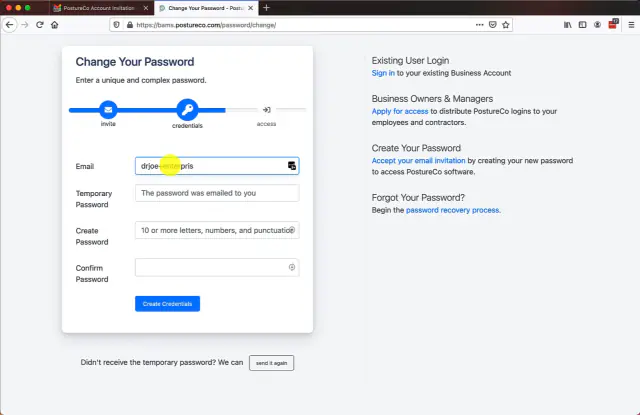
In this tutorial we review the step of creating your own unique password after an administrator issues you login credentials for your PostureScreen Enterprise user account.
Please note after you create your password, you will need to install the PostureScreen Enterprise version (not the normal PostureScreen app), and you can find this on the Apple AppStore (not Android). You may search AppStore for “PostureCo Enterprise” to find the application or click the following link if you are viewing this on your iPhone or iPad. https://apps.apple.com/us/app/posturescreen-enterprise/id1460610762
 4:02
4:02
Related articles
-
 PostureScreen for iPad & iPhone
Cloud Backup Services – Reset password
Please note: SyncScreen has rebranded to Cloud Backup Services. In this tutorial we will review how to reset a Cloud Backup Services…
Video · 4:04
PostureScreen for iPad & iPhone
Cloud Backup Services – Reset password
Please note: SyncScreen has rebranded to Cloud Backup Services. In this tutorial we will review how to reset a Cloud Backup Services…
Video · 4:04
-
PostureScreen for iPad & iPhone
Logging into Enterprise App – First Steps
In this tutorial we will review how to download and login to your enterprise version of PostureScreen for which your administrator has set…
Video · 3:58
-
PostureScreen for iPad & iPhone
Enterprise version of PostureScreen
To serve the needs of larger facilities (gym franchises, clinic chains, and group practices with many therapists) we have created an easy…
4 videos · 26:153 min read
-
PostureScreen for iPad & iPhone
Requesting Email change on your PostureCo Cloud Services account
Please note the following is to be used for only changing your Enterprise PostureScreen Account Ownership, Your SyncScreen Cloud…
Video · 5:251 min read
-
PostureScreen for iPad & iPhone
iOS Passcode Security App Lock and report encryption (HIPAA)
There are many features of PostureScreen mobile that allow the user to turn on many security features that can help you meet your HIPAA…
Video · 2:292 min read
- PostureRay X-Ray EMR Virtual View Box Password Reset In this tutorial we will walk you through how to reset your password credentials Video · 3:31
Have a question?
Talk to the people who build PostureScreen and PostureRay.
PostureScreen support is by email. Live PostureRay support runs Monday through Friday, 9 AM–5 PM Eastern (excluding U.S. holidays).