Get the app

Fast, objective functional movement assessment. Documented in seconds.

SquatScreen is an assessment module within the PostureScreen® platform. It plots anatomical landmarks on overhead squat, single-leg squat and push-up/plank screens, predicts overactive and underactive muscles, and suggests possible corrective exercises for you to choose from with a WebExercises account.

Included with PostureScreen® subscriptionA module on iPhone and iPad

PostureScreen®: $59.99 USD to start, with 30 days of unlimited use. Then $24.99 USD/month or $249 USD/year for unlimited assessments.

SquatScreen at a glance

SquatScreen is the functional movement screen module inside PostureScreen®, made by PostureCo, Inc. It is included with PostureScreen® on iPhone and iPad, and documents each screen with landmarks, predicted overactive and underactive muscles, PDF reports, annotated images and side-by-side videos.

Who it’s for
Personal trainers, strength and conditioning specialists, athletic trainers, chiropractors, physical therapists and other fitness and manual therapy professionals.
What it measures
AP, PA and lateral overhead squats, the single-leg squat and push-up/plank, with anatomical landmarks and predicted overactive and underactive muscles.
Platform
A module inside PostureScreen® on iPhone and iPad, with iOS 26 or iPadOS 26 or later. Augmented Reality assistance needs an Unlimited Assessment Subscription. Apple iOS only.
Price
Included with PostureScreen®: a $59.99 USD one-time download with 30 days of unlimited use, then $24.99 USD/month or $249 USD/year.

Built for professionals who assess posture, movement, and body composition.

SquatScreen is for personal trainers, physical therapists, chiropractors, Pilates instructors, osteopaths, gym and fitness professionals, occupational therapists, athletic trainers, yoga instructors, sports medicine professionals, strength and conditioning specialists and massage therapists.

Movement screens

Five screens.
Every one objective.

Fast and objective functional movement screens, each with on-screen annotation and markup.

  • 01

    AP overhead squat

    The front view: facing the camera, arms overhead.

  • 02

    PA overhead squat

    The back view: facing away from the camera, arms overhead.

  • 03

    Lateral overhead squat

    The side view, from the start to the end of the movement.

  • 04

    Single-leg squat

    A single-leg squat assessment, with the same markup tools.

  • 05

    Push-up / plank

    A push-up and plank assessment, with the same markup tools.

For every screen, SquatScreen plots the anatomical landmarks and predicts overactive and underactive muscles.

PostureCo’s software tools are intended for objective postural, movement, body composition, and radiographic measurement, documentation, and education purposes. They are designed for use by fitness professionals and licensed healthcare providers. These software tools are not medical devices and are not intended to diagnose, treat, cure, or prevent any disease or medical condition. All markings, landmark placements, and digitizations, whether manual or AI-assisted, must be reviewed and validated by the professional using the software. The user remains solely responsible for all interpretations, clinical judgments, diagnoses, and treatment decisions.


Results, view by view

Front, side and back.
Start to end, on one screen.

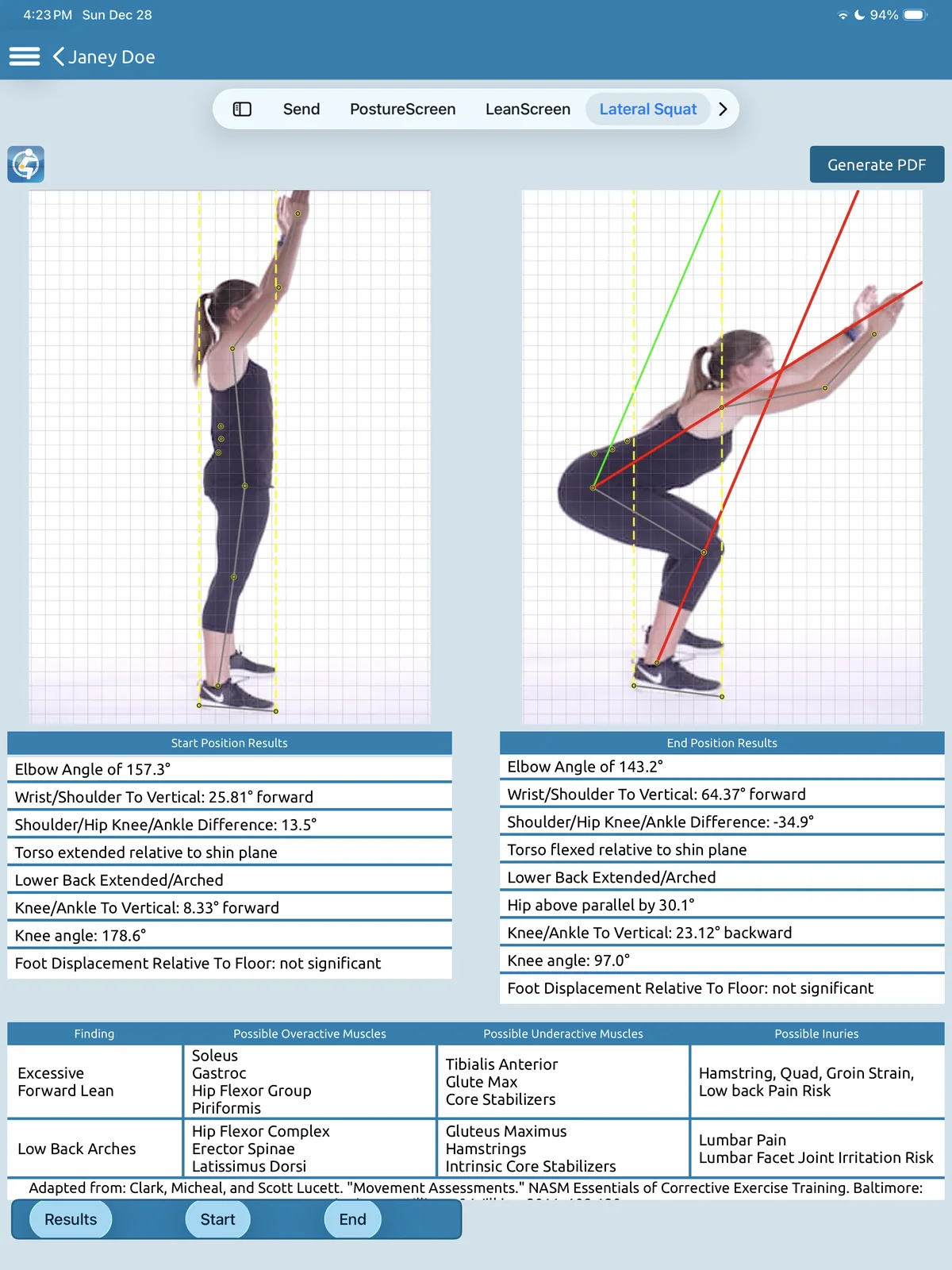
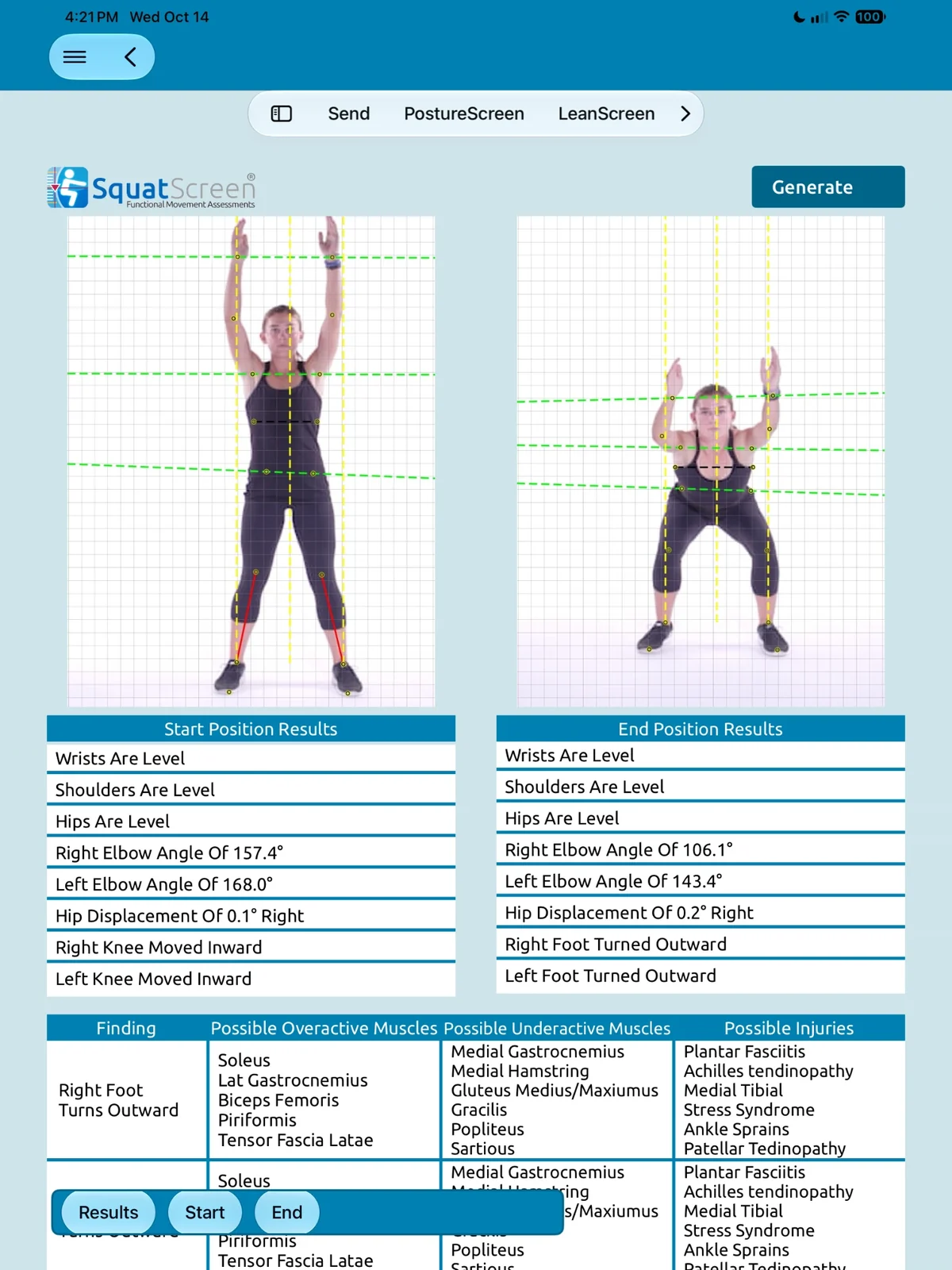
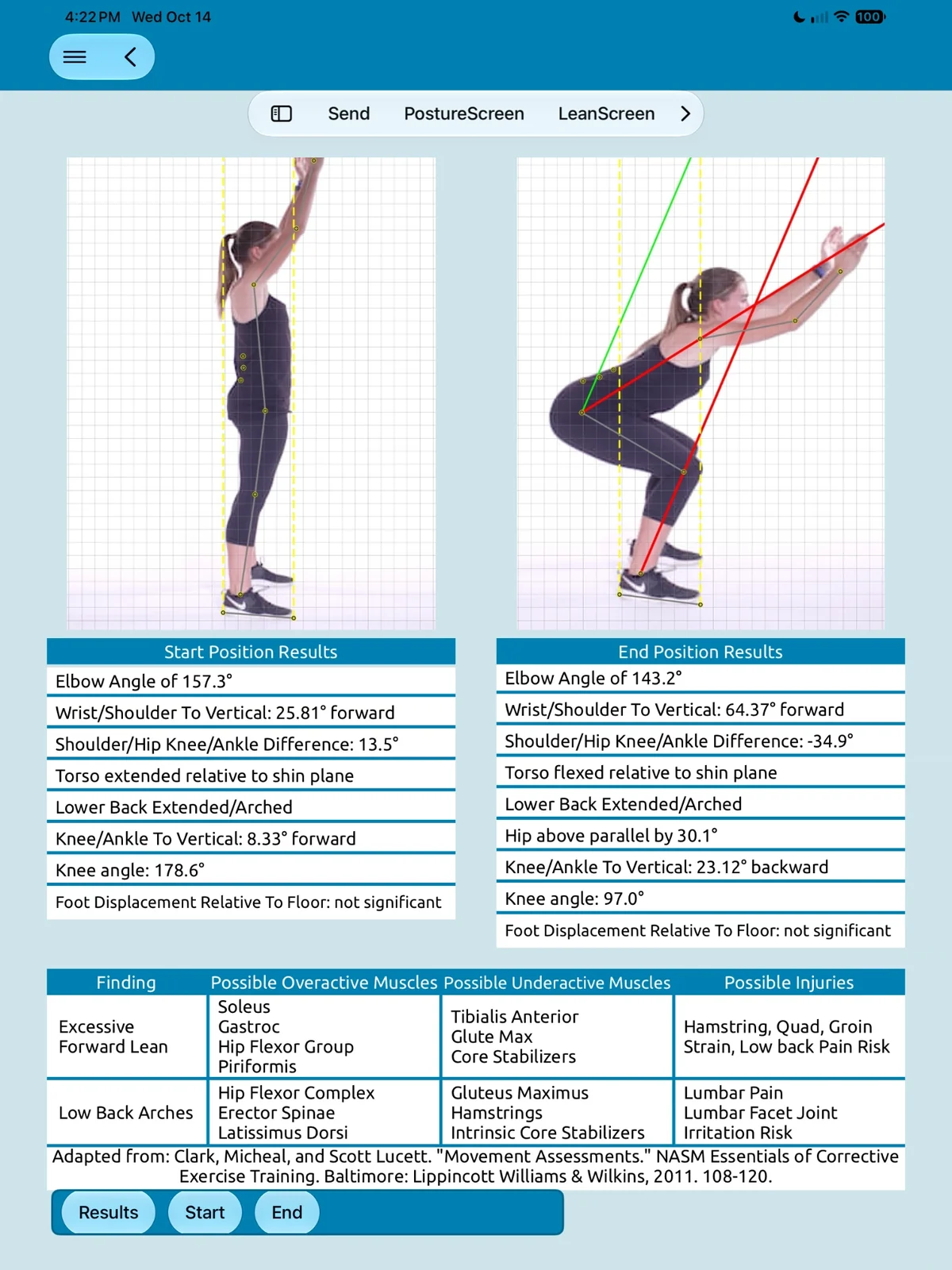
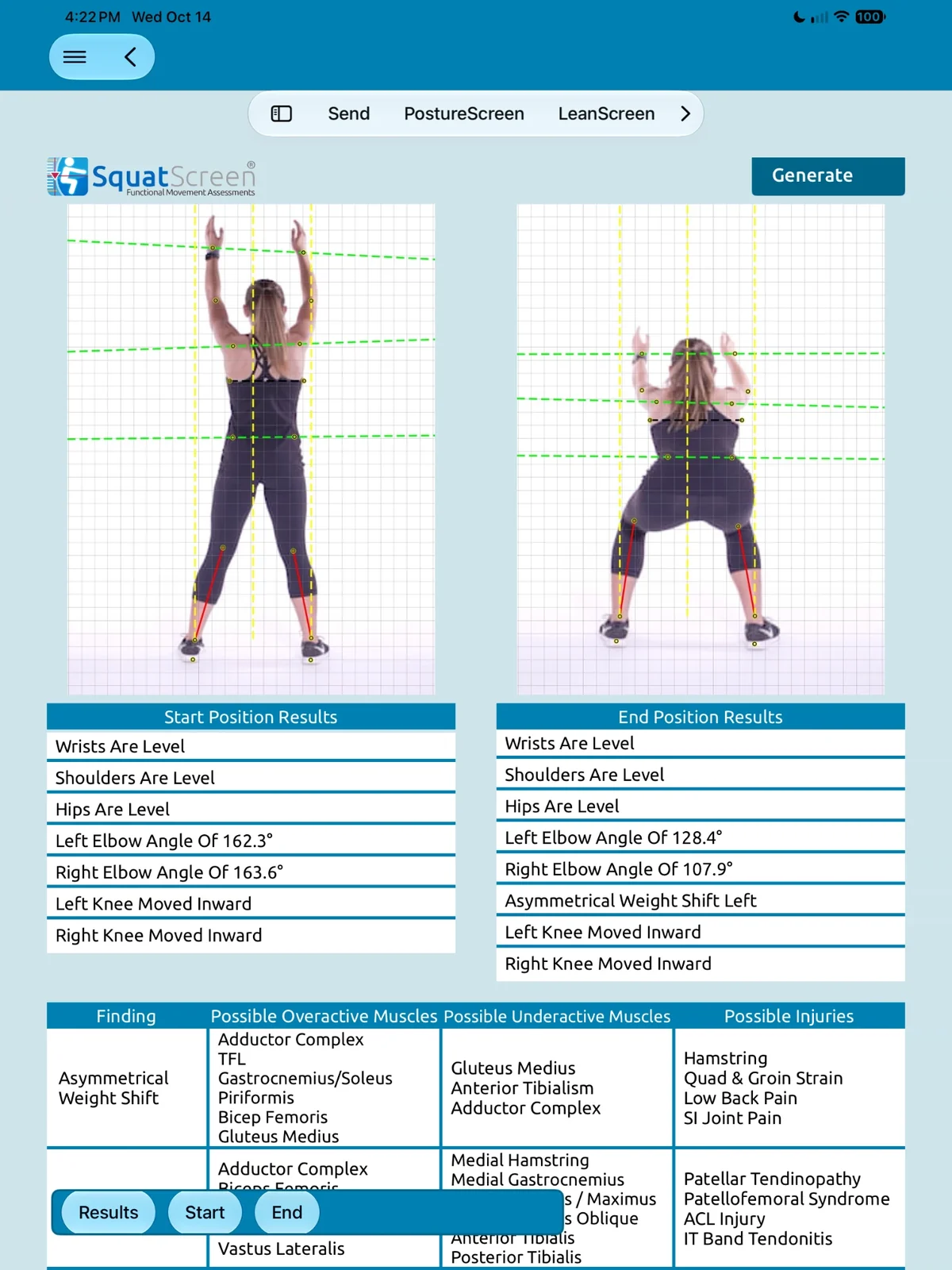
Each overhead squat view puts the start and end positions side by side, lists the results for each, then the findings with possible overactive and underactive muscles.

AP overhead squat · front

Wrists, shoulders and hips level, both elbow angles, hip displacement, knees moving inward and feet turning outward.

Lateral overhead squat · side

Elbow and knee angles, wrist/shoulder and knee/ankle to vertical, torso relative to the shin plane, lower-back arch, depth relative to parallel and foot displacement.

PA overhead squat · back

Wrists, shoulders and hips level, both elbow angles, asymmetrical weight shift and knees moving inward.

SquatScreen AP overhead squat results on iPad: start and end photos from the front on a grid with landmark points and lines, start and end position results such as elbow angles, hip displacement and knees moved inward, and a findings table for right foot turns outward with possible overactive and underactive muscles.SquatScreen lateral overhead squat results on iPad: start and end photos from the side with landmark points and lines, start and end position results such as elbow and knee angles, hip above parallel and lower back arched, and a findings table for excessive forward lean and low back arches with possible overactive and underactive muscles.SquatScreen posterior (PA) overhead squat results on iPad: start and end photos from behind on a grid with landmark points and lines, start and end position results such as elbow angles, asymmetrical weight shift left and knees moved inward, and a findings table with possible overactive and underactive muscles.

What SquatScreen documents

From landmarks to muscles
to a report.

Every screen becomes objective documentation: landmarks on the movement, results at its start and end, the muscles to target, and reports your client can see.

  • Anatomical landmarks

    AI-assisted landmark detection finds the anatomical landmarks on each movement. You always validate them, and can adjust any point.

  • Start and end positions

    Results for the start and the end of the movement, side by side.

  • Overactive and underactive muscles

    Predicted from the findings, to target with corrective exercise. Adapted from NASM values and guidelines.*

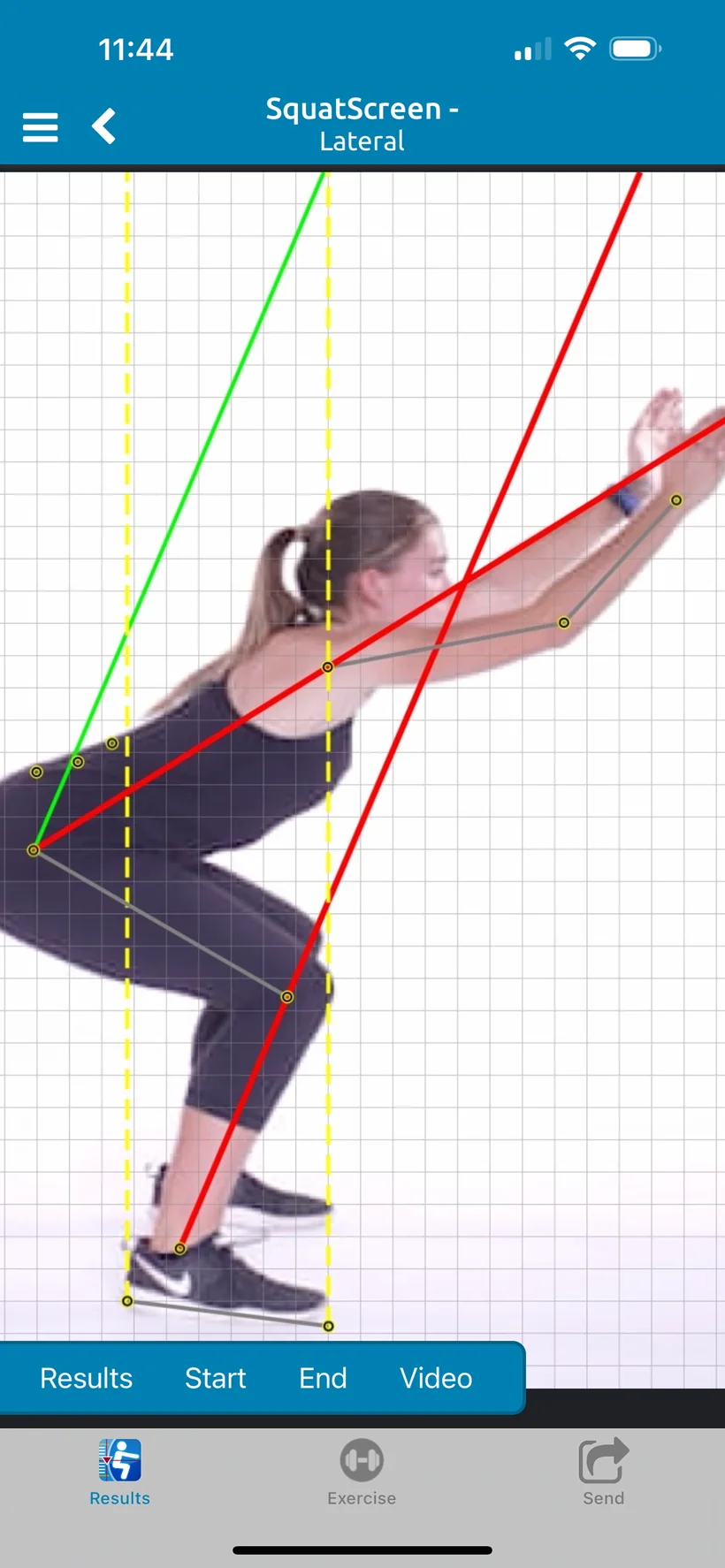
SquatScreen lateral overhead squat on iPhone for the demo client: the end position on a grid, with landmark points, yellow vertical reference lines, and green and red lines along the torso and shins.
  • Augmented Reality assistance

    Real-time overlays on your client while you take the pictures.4

  • Side-by-side comparison video

    Side-by-side movement comparison videos that you can export.

  • Movement comparison reports

    PDF reports, plus annotated JPG images.

  • Also
  • HIPAA compliant
  • iPhone and iPad
  • Curated possible correctives with WebExercises

Corrective exercise

From findings to correctives.

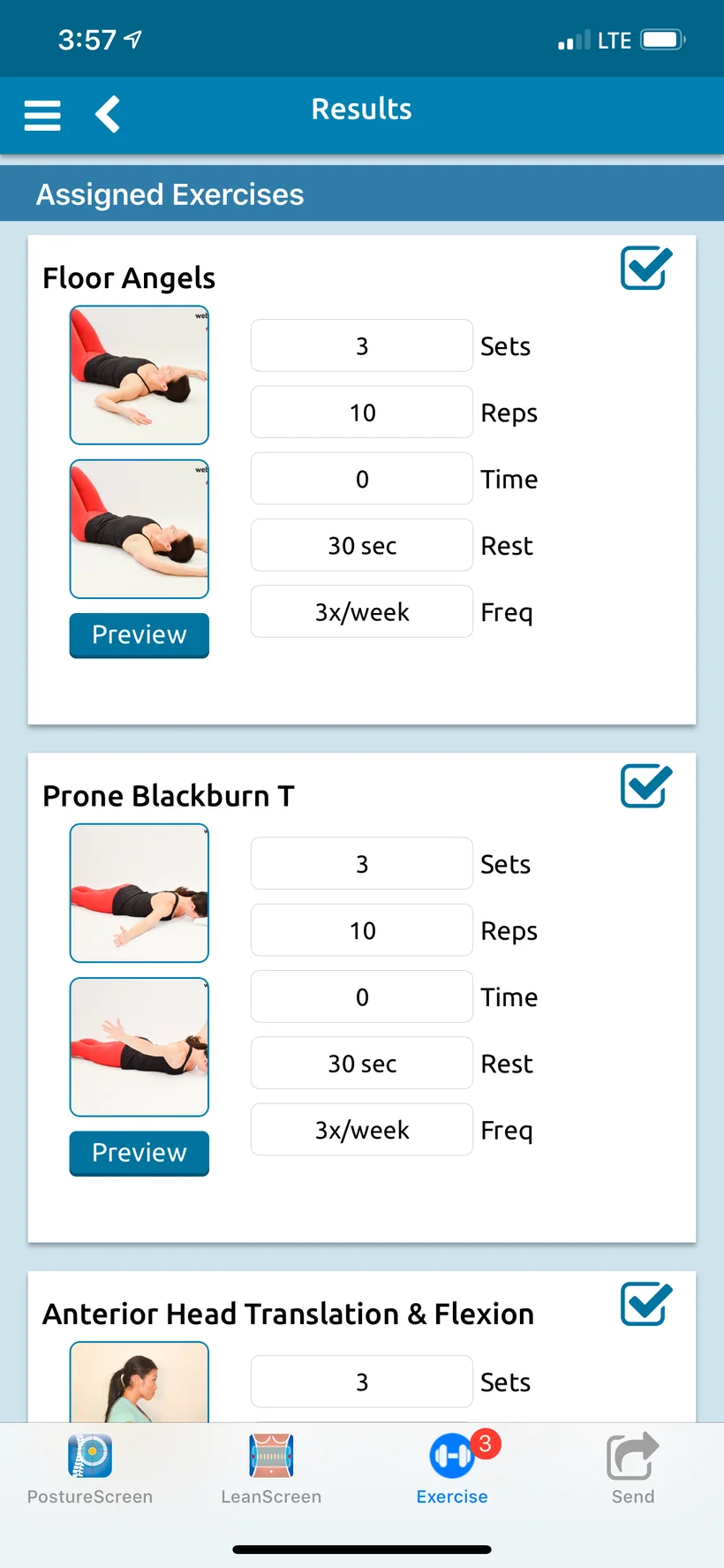
With a WebExercises account, SquatScreen curates possible corrective exercises from your client’s own movement faults, noted in the assessment and compared to normative data.

  • Matched to the findings. A subset of possible correctives that meet the criteria from the assessment, for you to choose from where they apply.
  • Your call, always. Review the possible corrective exercises, then you choose the exercises, sets, reps and frequency for your client.
  • WebExercises requires its own subscription. Exercise content is not included with PostureScreen® or its in-app subscriptions.
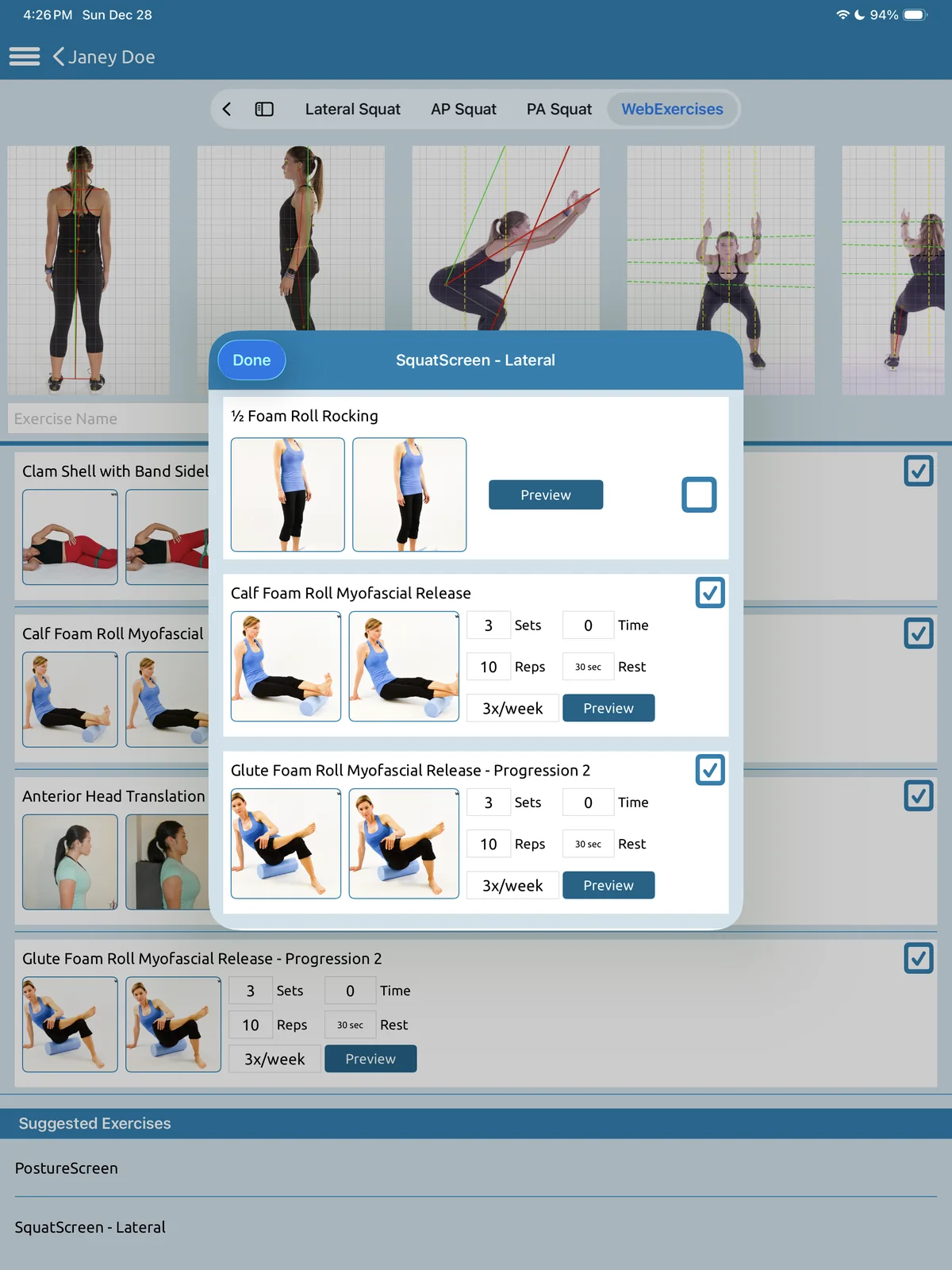
SquatScreen lateral on iPad for the demo client Janey Doe with the WebExercises sheet open: possible corrective exercises such as calf and glute foam roll myofascial release, with sets, reps, rest and frequency.
Curated possible correctives from a lateral overhead squat, for you to choose from

Virtual movement screens

Screen movement
from anywhere.

With RemoteScreen, your client records a voice-guided movement video, such as a lateral overhead squat, at home in their phone’s browser, with nothing to install, and submits it to you.

  • Free for your clients, on their own iPhone, Android phone or computer.
  • An add-on for you: RemoteScreen needs a PostureScreen® Unlimited subscription on iOS plus Cloud Services, starting at $9.99 USD/month, with unlimited posture photo and movement video uploads, limited only by your storage.
  • Verified by you first. You download the movement video and process it in PostureScreen®, just as if you had recorded it on your own iPad. Clients never see results in RemoteScreen.
  • Works worldwide. Clients anywhere can send photos and video.
  • Great for re-evaluations, follow-ups, reconnecting with clients you haven’t seen in a while, comparisons, remote monitoring, new clients, health talks and virtual exams. An ergonomic screen is coming soon.

RemoteScreen’s AI-Guided Health History is USA only at this time and needs Cloud Services Platinum ($49.99 USD/month) or higher plus a PostureScribe.AI subscription, with up to 20 intakes per month on Platinum.

A guided squat, at home“Recording — keep going.”
Submitted to you“Assessment Submitted”

Watch

SquatScreen in action.

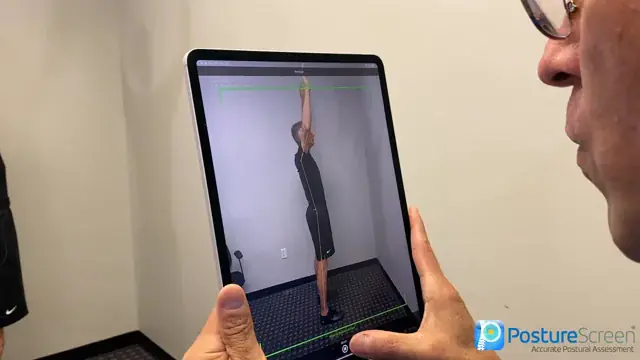
A PostureCo™ tutorial: a lateral overhead SquatScreen with Augmented Reality assistance.
Included
LeanScreen, SquatScreen, ROMScreen™ and SitScreen, inside PostureScreen®
Runs on
iPhone and iPad, with iOS 26 or iPadOS 26 or later
To start
$59.99 USD, with 30 days of unlimited use
Then
$24.99 USD/month or $249 USD/year for unlimited assessments
Devices
Up to 10 under the same Apple account

What’s included

Included with PostureScreen®.
Add more when you need it.

LeanScreen®, SquatScreen®, ROMScreen™ range of motion and SitScreen® are modules inside PostureScreen® on iPhone and iPad, included with PostureScreen®. RemoteScreen® and PostureScribe.AI® are add-on subscriptions, and PostureRay® is separate software.

Included with PostureScreen®

$59.99 USD to start, with 30 days of unlimited use. Then $24.99 USD/month or $249 USD/year for unlimited assessments.

Add-on subscriptions

+ Cloud Services

Remote photo and video assessments worldwide, in your client’s own browser, with nothing to download. Every result comes to you to verify first; clients never see results. Free for clients; you add Cloud Services, from $9.99 USD/month, with unlimited photo and video uploads (limited only by your storage). The AI-Guided Health History (USA only at this time) needs Cloud Services Platinum ($49.99 USD/month) or higher plus a PostureScribe.AI subscription, with up to 20 intakes per month on Platinum.

About RemoteScreen

The ambient AI scribe with your assessment data built in. $49.99 USD/month with an initial 7-day free trial; requires the Unlimited Assessment Subscription. USA only.

About PostureScribe.AI

Separate software

Windows-based X-ray analysis and documentation software for chiropractors, with its own license. PostureScreen® images can be pushed to PostureRay through the Virtual View Box.

About PostureRay

Straight answers

Questions, answered.

Still wondering? Call 866-577-7297 or send us a message.

What is SquatScreen?

SquatScreen is an assessment module within the PostureScreen® platform for fast, objective functional movement assessments. It plots anatomical landmarks, predicts overactive and underactive muscles, and suggests possible corrective exercises for you to choose from with a WebExercises account.

Is SquatScreen included with PostureScreen®?

Yes. SquatScreen is a module inside PostureScreen® on iPhone and iPad, included with PostureScreen®: $59.99 USD to start, with 30 days of unlimited use, then $24.99 USD/month or $249 USD/year for unlimited assessments. See pricing

Which movement screens does it include?

The AP overhead squat, PA overhead squat, lateral overhead squat, single-leg squat and push-up/plank, each with on-screen annotation and markup.

What does SquatScreen document?

Movement comparison reports as PDFs and annotated JPG images, plus side-by-side movement comparison videos that you can export.

Does SquatScreen suggest corrective exercises?

Yes, with a WebExercises account: SquatScreen curates possible corrective exercises from the client’s movement faults, noted in the assessment and compared to normative data. You review them and choose the exercises, sets, reps and frequency. WebExercises content is not included with PostureScreen® or its in-app subscriptions; you need an account in good standing with WebExercises.

Does SquatScreen use Augmented Reality?

Yes. SquatScreen now has Augmented Reality assistance. It needs iOS 26 or iPadOS 26 or later and an Unlimited Assessment Subscription.

Can clients record movement screens from home?

Yes, with RemoteScreen, an add-on: your client records a guided movement video in their phone’s browser, with nothing to install, and submits it to you. It comes to you first to verify; clients never see results in RemoteScreen. You need a PostureScreen® Unlimited subscription on iOS plus Cloud Services, starting at $9.99 USD/month. Photos and video work worldwide; RemoteScreen’s AI-Guided Health History is USA only at this time and needs Cloud Services Platinum ($49.99 USD/month) or higher plus a PostureScribe.AI subscription, with up to 20 intakes per month on Platinum.

Is SquatScreen HIPAA compliant?

Yes. SquatScreen is HIPAA compliant.

Which devices does SquatScreen run on?

iPhone and iPad, as part of PostureScreen®, with iOS 26 or iPadOS 26 or later. SquatScreen is available for Apple iOS only.

Research

Scientifically validated.
Professionally trusted.

Verified counts, as of October 2026.5 See every study

157
published studies have used or validated PostureScreen®
133
of them are peer-reviewed journal articles
62
publications on the PostureRay research page

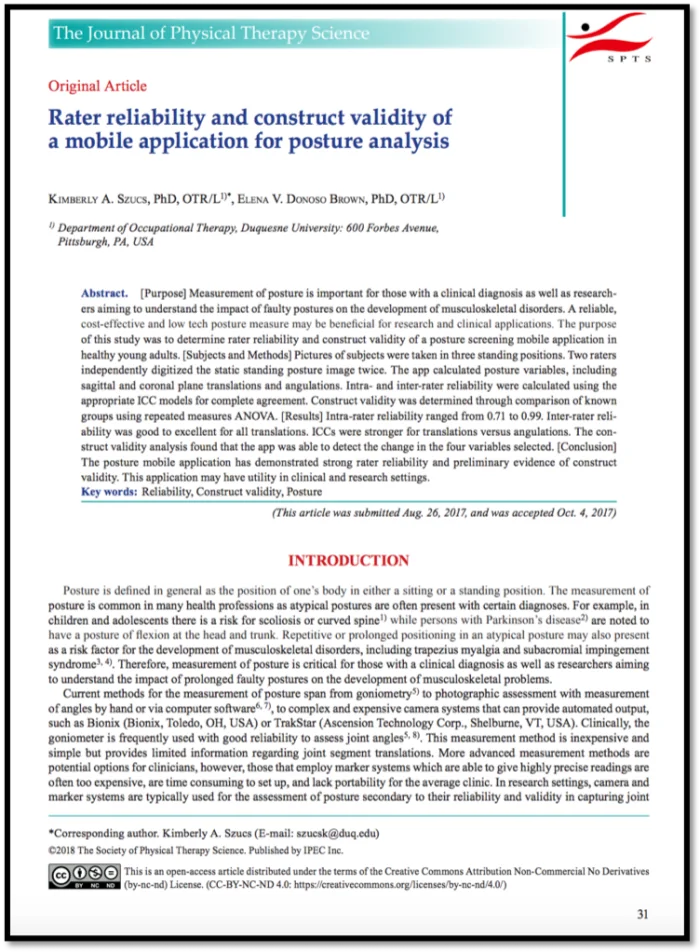
“The PostureScreen mobile application has demonstrated strong rater reliability and preliminary evidence of construct validity.”

Rater reliability and construct validity of a mobile application for posture analysis. J Phys Ther Sci, 2018

Powerful, professional and versatile.

Document objective assessments in seconds. SquatScreen is included with PostureScreen® on iPhone and iPad.